

 Account
 Billing
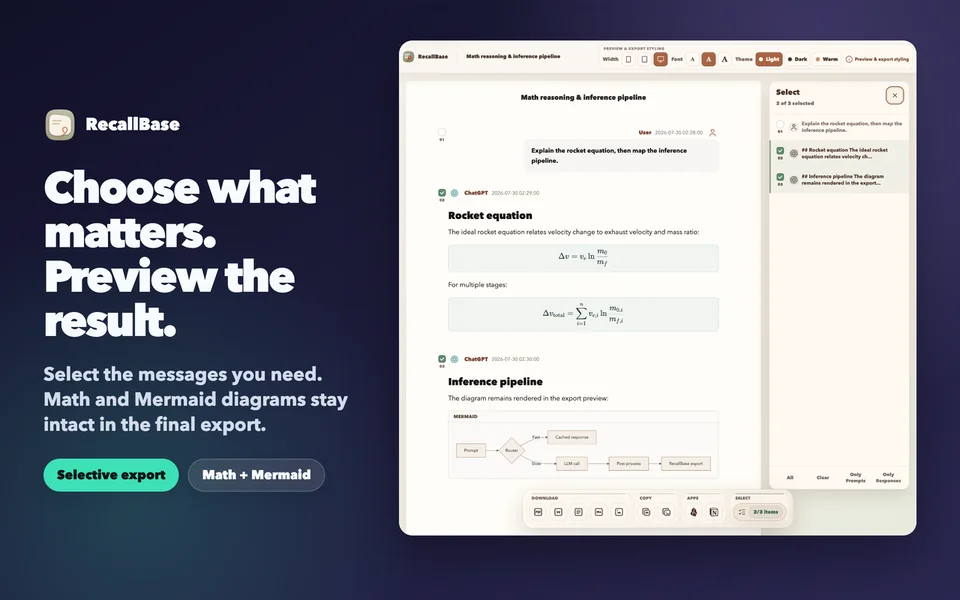
The PDF workflow in one minute
Open the ChatGPT conversation, launch RecallBase Export Studio, choose the messages that belong in the document, review rich content, and start the PDF action. The browser extension tour shows the complete reviewed interface, while the PDF documentation explains current Free and Pro limits and the browser save boundary.
The extension prepares a clean conversation document locally. Chrome or another Chromium browser then owns the print or save dialog: destination, paper size, scale, margins, headers, and final completion. RecallBase cannot see whether you clicked Save or Cancel, so open the finished file and verify it.
Why preview matters more than the export button
Copy-and-paste can flatten roles, damage indentation, split tables, and turn rendered math or diagrams into source text. Printing an ordinary web page can include sidebars, navigation, sticky controls, and spacing designed for a screen rather than a document. A useful ChatGPT to PDF extension should therefore provide evidence before asking the browser to create a file.
RecallBase Export Studio uses the production selection panel, not a mock browser frame. It lets you choose specific messages and inspect a document preview. The current reviewed fixture includes two KaTeX equations and a Mermaid flowchart, proving that these content types can be rendered in the Studio view. Code blocks, tables, headings, lists, and role labels should also be inspected before export.
Content fidelity support
| Content type | Studio behavior | What to verify in the PDF |
|---|---|---|
| Plain text and headings | Preserved as readable document structure | Line breaks and heading hierarchy |
| Code blocks | Kept as distinct formatted blocks | Long lines, wrapping, and page breaks |
| Tables | Rendered in the preview | Column width and clipping at the selected paper size |
| KaTeX formulas | Rendered as formatted mathematics | Symbols, fractions, and page-break placement |
| Mermaid diagrams | Rendered as diagrams in Studio | Diagram scale and label readability |
| Selected messages | Included according to the selection panel | No missing context or accidental private message |
Formula and diagram support does not mean every browser print setting will produce the same layout. A wide diagram may need landscape orientation or a smaller scale. A long code line may wrap differently in PDF. The correct promise is strong local preview plus final-file verification—not invisible control over the operating system’s PDF engine.
Select important messages before exporting
Many ChatGPT threads contain abandoned directions, corrections, and repetitive clarification. Exporting the entire conversation can bury the decision that matters. Open the real selection panel and remove messages that do not contribute to the record. Keep enough user context to make the answer understandable, and keep any formula, diagram, table, or code block that the conclusion depends on.
Selection also improves privacy. If one message contains a credential, personal detail, client name, or unrelated private context, exclude it before creating a portable document. A PDF is easy to attach and forward, so it deserves a deliberate review even when the local capture itself is acceptable.
Complete the browser save step
After choosing PDF, select a known destination in the browser dialog. Review paper size, portrait or landscape orientation, margins, scale, and optional browser headers. Complete the save, then open the file outside the browser.
Check the first and last pages, any wide table, the longest code block, rendered equations, and the Mermaid diagram. Confirm the filename and folder manually. RecallBase does not receive the filename or local path and cannot report that the operating system completed the write.
When Markdown is the better answer
PDF is best for a fixed readable record, printing, coursework, client handoff, or an attachment. Markdown is better when the content must remain editable, searchable in a note system, reviewed in Git, or reflowed for another document. Word is useful when collaborators expect a word processor. JSON is for local structured processing.
If a PDF becomes dozens of pages, split the thread by topic or export selected messages. If a wide Mermaid diagram stays unreadable even in landscape, export to Markdown and keep the diagram source with the surrounding explanation. The save ChatGPT guide compares the broader options.
Local-first privacy boundary
RecallBase prepares the ChatGPT PDF workflow locally. Website account and entitlement checks never need raw prompts, answers, code, formulas, diagrams, DOM, filenames, local paths, cookies, tokens, or screenshots. The selected document reaches a file only through the browser save action the user completes.
How to export a ChatGPT conversation to PDF
- Step 1
Open the ChatGPT thread
Wait for the response to finish, then confirm that the thread contains the messages you need.
- Step 2
Open Export Studio
Capture the conversation and use the real selection panel to include only the important messages.
- Step 3
Review rich content
Inspect headings, code, tables, formulas, and Mermaid diagrams in the preview before choosing PDF.
- Step 4
Save and verify the file
Complete the browser print or save dialog, open the resulting PDF, and confirm that no content was cropped.
Files, destinations, and local saves
File formats include Markdown, PDF, Word, text, JSON, and image. Notion, Google Docs, and Obsidian are explicit destinations, while the browser-local archive stays on your device. The table keeps those option types distinct in their labels.
| Option | Free | Pro |
|---|---|---|
| Markdown file | Unlimited | Unlimited |
| PDF file | 3 / local day + watermark | Unlimited + no watermark |
| Word file | 3 / local day | Unlimited |
| Text file | Unlimited | Unlimited |
| Image file | Watermarked | No watermark |
| JSON file | Unlimited | Unlimited |
| Notion destination | 3 / local day | Unlimited |
| Google Docs destination | 3 / local day | Unlimited |
| Obsidian destination | Unlimited | Unlimited |
| Browser-local archive | Unlimited | Unlimited |
Know the boundary before you rely on it.
- Supported AI sites can change their interfaces; current compatibility lives in the support docs.
- Removing the extension can remove browser-local records, so export anything irreplaceable first.
- Files and authorized app destinations control their final save result; verify the output after export.
Questions
Can RecallBase export only selected ChatGPT messages?
Yes. Export Studio lets you choose the messages that belong in the document before starting the PDF workflow.
Does the PDF preserve formulas and Mermaid diagrams?
The reviewed Export Studio preview renders KaTeX formulas and Mermaid diagrams, alongside code and tables. Always inspect the final PDF because browser print settings still affect layout.
Can RecallBase tell whether the PDF was saved?
No. The browser and operating system control the final print or save dialog, so the extension cannot confirm whether it was completed or canceled.
What should I use when the PDF layout is too dense?
Use Markdown when the content needs editing, reflow, or code-friendly handling. Split very long conversations into smaller exports when necessary.
Does PDF export upload my ChatGPT conversation?
No. Export preparation occurs locally, and website account or billing checks do not require raw prompts, answers, DOM, paths, filenames, tokens, or screenshots.