

 Account
 Billing
Export one valuable Claude thread, not an account
Open the supported Claude conversation, capture it with the browser extension, choose the messages that matter, and review the result before exporting. This is a per-conversation workflow, distinct from Claude’s provider-controlled account export. The supported apps documentation is the source of truth when a Claude surface or page type changes.
Claude conversations are often long because they contain research, drafts, code review, analysis, requirements, and revisions. That makes blind copy-and-paste especially fragile. A useful exporter must preserve the thread’s structure, help the user remove abandoned branches, and make the output readable in the format selected for the next task.
How RecallBase handles a Claude conversation
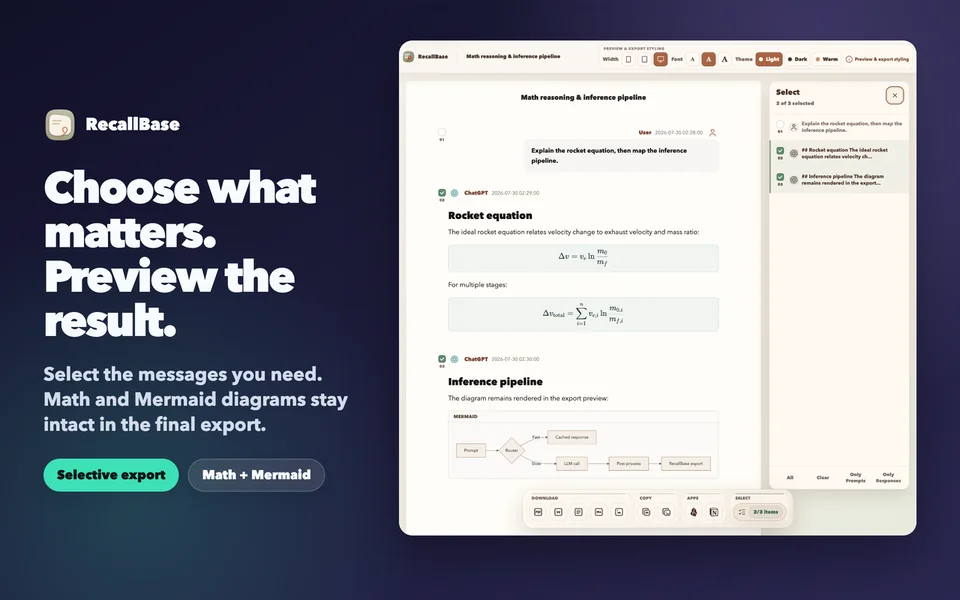
RecallBase captures the supported conversation page into browser-local storage. Export Studio then shows the production selection panel and a document preview. You can keep the complete thread or choose the question, final answer, code explanation, table, formula, or diagram that forms the useful record.
The workflow is local-first. The RecallBase website can handle an account and entitlement without inspecting the conversation. A selected export leaves local storage only when you choose a file or authorized destination. There is no Claude cloud-sync product hidden behind the save button.
Choose the format by destination
| Format | Best use for Claude work | Check before finishing |
|---|---|---|
| Markdown | Editable research, documentation, code-adjacent notes | Heading hierarchy, fenced code, and diagram source |
| A fixed record, printing, class or client handoff | Page breaks, wide tables, formula size, and diagram scale | |
| Word | Collaborative document editing and review | Styles, table width, and code wrapping |
| JSON | Local scripts, migration, or structured processing | Message roles, ordering, and downstream schema assumptions |
| Image | A visual excerpt or snapshot | Resolution, crop, and sensitive content |
| Notion or Obsidian | An intentional move into an existing note workflow | Destination access and selected message scope |
Markdown is usually the strongest default for a long Claude thread because it remains editable and handles headings, lists, code, and text well. PDF is appropriate when the content should stop changing. Word fits reviewers who work in a word processor. JSON should be chosen for local processing rather than readability.
Formulas, Mermaid, code, and tables
The current Export Studio preview renders KaTeX formulas and Mermaid diagrams and keeps code and tables as structured blocks. This is unusual enough to require visible proof rather than a feature claim. The reviewed synthetic fixture includes multiple equations and a flowchart in the real Studio component.
Still, preview fidelity and destination fidelity are not identical. Browser PDF settings can shrink a wide diagram. Word can reflow a table. Markdown may preserve Mermaid source rather than a rendered bitmap depending on the destination. Open the final output and verify the specific content type that matters.
For a long conversation, inspect the first and last selected messages. Check that code fences close, table headers remain associated with their rows, equations contain the expected symbols, and diagram labels are readable. If one output format performs poorly for the material, switch formats rather than forcing a fragile document.
Select messages to improve the archive
Claude threads often evolve through corrections and alternatives. The complete process can be valuable, but sometimes only the final requirements and response belong in the deliverable. Use message selection to remove unrelated context, repeated attempts, and sensitive content.
Keep enough of the user’s prompt to explain the answer. A standalone assistant response may look polished but become ambiguous later. For research, include the question, assumptions, and conclusion. For code review, include the relevant code context and final recommendation. For a strategy draft, include the constraint that caused the decision.
The AI conversation archive page explains why curated records are easier to search than a complete dump of every AI interaction.
Claude account export versus RecallBase
A Claude account export is managed by Anthropic and may cover more than one conversation. Its availability and format can change with the provider’s product and plan. RecallBase does not claim to replace it, control Claude history, restore deleted conversations, or capture every Claude surface.
RecallBase owns a narrower workflow: supported conversation capture, browser-local save, local review, selection, and explicit export. That narrower boundary makes troubleshooting clearer. If a conversation is missing from the preview, check the active page and wait for the answer to finish. If the final file is wrong but the preview is correct, investigate the chosen output and its settings.
Local-first privacy boundary
RecallBase keeps supported Claude captures browser-local by default. The website does not receive raw prompts, answers, artifacts, code, formulas, diagrams, DOM, filenames, local paths, cookies, tokens, or private screenshots; selected content leaves only through an export the user initiates.
How to export a Claude conversation
- Step 1
Open the supported Claude thread
Wait for the current response to finish and confirm that the conversation contains the work you intend to preserve.
- Step 2
Capture and select messages
Use RecallBase to save the thread locally, then keep only the messages needed for the record.
- Step 3
Review structured content
Inspect long text, code, tables, formulas, and Mermaid diagrams in Export Studio before choosing an output.
- Step 4
Export and verify
Create Markdown, PDF, Word, JSON, image, Notion, or Obsidian output, then verify the result in its destination.
Files, destinations, and local saves
File formats include Markdown, PDF, Word, text, JSON, and image. Notion, Google Docs, and Obsidian are explicit destinations, while the browser-local archive stays on your device. The table keeps those option types distinct in their labels.
| Option | Free | Pro |
|---|---|---|
| Markdown file | Unlimited | Unlimited |
| PDF file | 3 / local day + watermark | Unlimited + no watermark |
| Word file | 3 / local day | Unlimited |
| Text file | Unlimited | Unlimited |
| Image file | Watermarked | No watermark |
| JSON file | Unlimited | Unlimited |
| Notion destination | 3 / local day | Unlimited |
| Google Docs destination | 3 / local day | Unlimited |
| Obsidian destination | Unlimited | Unlimited |
| Browser-local archive | Unlimited | Unlimited |
Know the boundary before you rely on it.
- Supported AI sites can change their interfaces; current compatibility lives in the support docs.
- Removing the extension can remove browser-local records, so export anything irreplaceable first.
- Files and authorized app destinations control their final save result; verify the output after export.
Questions
Can RecallBase export a selected Claude conversation?
Yes. On a supported Claude conversation page, RecallBase captures the thread locally and lets you choose messages before exporting.
Which format is best for a long Claude conversation?
Markdown is usually best for editable long-form work, PDF for a fixed readable record, Word for document review, and JSON for local processing.
Does the Claude exporter preserve formulas and diagrams?
Export Studio renders KaTeX formulas and Mermaid diagrams in its reviewed preview. Check the final file because output format and browser settings still affect layout.
Does RecallBase replace Claude account export?
No. Claude account export is provider-controlled and account-wide. RecallBase is a selected browser conversation save, review, search, and export workflow.
Does RecallBase sync Claude conversations to the cloud?
No. Browser saves stay local by default, and the website does not receive raw Claude prompts, answers, artifacts, DOM, paths, tokens, or sensitive screenshots.